

Friendly Childminders' Hub


The Hub is temporarily closed!


So, What's Actually
in the Hub?
The Hub comprises 30 specially curated areas, known as Collections, with each one being focussed on an aspect of a childminder's work and/or home life.
They are specially curated because the Hub's founder was herself a childminder for several years after making the leap from teaching, and she also volunteers a lot of time to her Facebook group, Friendly Childminders that was established in 2018. This group has 10 000 members now, and it was the inspiration for the Hub, providing great insight into the topics and questions that childminders need the most help with.
Within each Collection are dedicated Spaces, which provide support, information and connection for a specific part of childminding.
For example, the Annual Inspiration Collection has tailored Spaces for each month of the year, seasons, and special occasions. So if a childminder needs some inspiration on one of the 93 days (!!) of January, they can pop in for some ideas that will suit their cohort's interests and developmental needs!
As the Hub grows, members will add more of their own ideas, knowledge and advice to the Spaces within the Collections. The founder will also be adding content on a regular basis across all the Collections too! Over time, a huge bank of inspiration, support and information will be collated that all subscribing members can access whenever they need to!

The Collections of the Friendly Childminders' Hub
by Sam Heaven ©
Here is a list of all 30 Collections that have been carefully curated for the Hub by its founder, with each one being focused on a different area of a childminder's professional and/or work life.
Within each Collection are dedicated Spaces, which provide support, information and connection for a specific part of childminding.
If the Collection is underlined, it will take you to more information about the Spaces within it to provide some examples of what you can expect. The images representing the Collections are screenshots from one of the Spaces in each Collection.
Kitchen

Annual Inspiration


Business Admin.

Diversity, Equality, Inclusion & SEND


Setting Your Stall Out

Thriving Through Challenges

Travel and Transport

Working With Others

Wrapping It Up


Pick and Choose Spaces to Follow
Every single childminding business across the UK is completely unique because every childminder has;
- their own family
- their own personal commitments
- their own childminding families, each with individual requirements
- their own setting whether that's their front room or a commercial space
- their own way of doing things
- their own needs and interests!
The Hub celebrates individuality by offering a wide variety of Spaces across 30 different Collections, so there's something for everyone and all members feel represented.
When members join, they are automatically added to all of the Spaces, giving them the chance to explore everything on offer and deciding what they are interested in.
If members come across Spaces that aren't their thing, they can simply 'unfollow' Spaces to tailor their Hub account to meet their specific needs and interests. To do this, just follow the simple steps here.
If members would prefer fewer notifications, they can also switch those off whenever they like. Guidance for this can be found here.
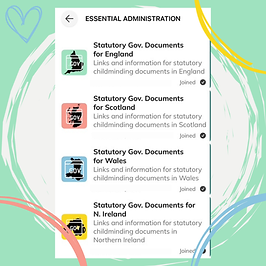
For example, in the Essential Administration Collection, there is a Space for the statutory documents for each country in the UK. A childminder based in England most likely only wants to know about the English documentation, so they can unfollow the other spaces to tailor the Collection to suit their needs and interests. Alternatively, if a childminder is based in one country and they are thinking of relocating to another, they can can follow that country's Space to learn more about it!
The Hub contains a 'Tech Help' Space for anyone who needs it, but here's a little look at how members can unfollow spaces or turn off notifications, so they can see how simple it is.