

Friendly Childminders' Hub


The Hub is temporarily closed!

How to Unfollow
a Space
Hub members can pick and choose which Spaces to follow, so they can curate their Hub to suit their interests and needs - have a look here to learn more about the thinking behind that!
Below is some 'tech help' to demonstrate how easy it is to unfollow (or follow) a Space in the Hub so members can make it entirely their own.
Open the Space and click on the three dots...

Then choose 'Personal Settings'...


Next, choose to 'Leave this Space'
Tada! All done in 3 clicks!
If you change your mind and wish to rejoin a Space, just go through the same process, but there will be an option to join instead!


How to Turn Off Notifications
Hub members can pick and choose which Spaces to follow and can opt to turn notifications on and off for those Spaces, so they can curate their Hub to suit their interests and need.
Below is some 'tech help' to demonstrate how easy it is to turn off (or turn on) the notifications for a Space so members can make it entirely their own.
Open the Space and click on the three dots...
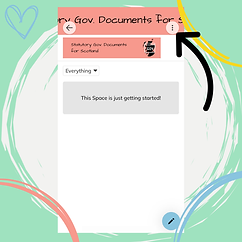
Then choose 'Personal Settings'...

Next, choose to switch off notifications for this Space.

Tada! All done in 3 clicks!
If you change your mind and wish to switch the notifications back on, just go through the same process and turn the little bar green.